Android and smartphones are widely used due to their flexibility. There are sometimes issues such as forgotten passwords, screen locks, pattern locks, boot loops, and system errors. In such a situation, Android Multi Tool offers repair and maintenance for these devices. The Android Multi Tool is designed to be Windows-based and performs several Android repair operations, such as removing screen locks, resetting devices, reading device info, and wiping data.
If you need more powerful features, we recommend trying: TFT Unlock Tool🔗
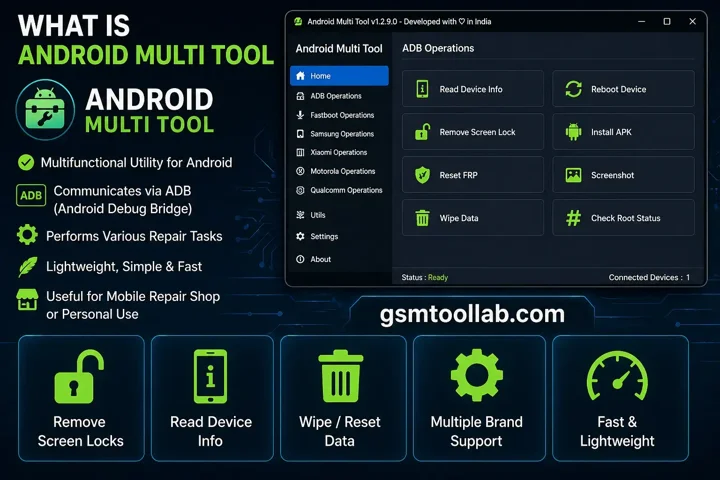
What is Android Multi Tool (AMT)?
Android Multi Tools is a multifunctional utility for Android that communicates via ADB (Android Debug Bridge) to perform various repair tasks. This tool is lightweight, has a simple interface, and executes quickly. This tool offers service at a mobile repair shop or at home for your own device.
Key Features Of TFT Unlock Tool
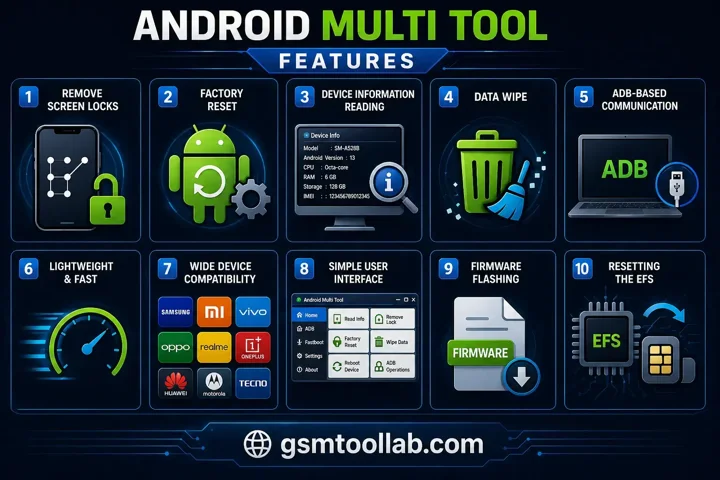
Remove Screen Locks
The Android Multi Tool Download offers a remove pattern. PIN and password locks from Android and smartphones.
Factory Reset
When you want to get your Android in the original setting. You can use it for a factory reset on Android. If the device gets stuck during a factory reset, the Android Multi Tool SOftware can easily pass the security layer and set the phone.
TFT Unlock Tool Data Wipe
This multifunctional tool allows technicians to wipe user data as well as cache partitions.
Device Information Reading
When you connect the device to the computer, the Android Multi Tool can read all information in your Android or smartphone.
ADB-Based Communication
The tool uses Android Debug Bridge commands to communicate with Android devices efficiently.
Lightweight & Fast
This tool is designed simply for running fast due to its lightweight. The device is straight from fastboot in energy download mode, so you can fix it within a second.
Wide Device Compatibility
The Multi Tool For Android supports a wide range of Android smartphones for repair and maintenance.
Simple User Interface
This tool has a user-friendly dashboard to perform operations easily. A new user can run this software without the worst technical knowledge about software.
Firmware Flashing
When you face a newswest manufacturer’s firmware in Android, you can flash the firmware. This tool can update the system or revive the corrupted files on your device.
Resetting the EFS
The IMEI number is sensitive network data; when it gets corrupted, you can lose the network signal. This tool offers a safe option to reset the encryption file system.
Pros and Cons
Pros:
- Android Multi Tool is easy to use.
- It offers fast and efficient performance.
- It supports multiple devices.
- It provides all-in-one functionality for various tasks.
Cons:
- It requires basic technical knowledge to use effectively.
- It may require paid activation to access full features.
- There is a risk of data loss during operations.
Safety Tips Before Using AMT
Before using the tool, it is important to follow some basic precautions:
- Always back up your data
- Use only the official version of the tool
- Avoid using cracked or modified software
- Ensure your device is compatible
By following these steps, you can protect your system and data from potential risks.
Supported Devices in Android Multi Tool
One of the biggest advantages of AMT is its wide compatibility with various devices.
Supported Brands:
- Karbonn
- SamsungXiaomi
- Vivo
- Oppo
- Realme
- Tecno
- Infinix
- Itel
System Requirements
Before using AMT, make sure your system meets the following requirements:
- Internet Connection: Required for updates and downloads
- Operating System: Windows 7, 8, 10, or 11 (32-bit / 64-bit)
- RAM: Minimum 2 GB (4 GB recommended)
- Storage: At least 500 MB of free space
- Processor: Intel or AMD (Dual Core or higher)
- USB Drivers: Properly installed Android USB drivers
How To Download Android Multi Tool (AMT)?
Step-by-Step Process:
- Install the Tool on your PC.
- Visit a trusted or official website, androidmultitool.
- Find the latest version of Android Multi Tool (AMT).
- Click on the download button.
- Extract the downloaded ZIP file.
Conclusion:
The Android Multi Tool has an easy to use dashboard for dealing with Bootloaders, FRP screens, Brand-specific Security operations, and wide device compatibility. Due to its lightweight, you can use this tool smoothly in a quick way. So, download this tool from our website and repair your device.
FAQ’s
Can Android multi tools unlock a phone?
Yes, Android Multi Tool can help unlock your device for different carriers, as long as your device model is supported. Unlocking allows you to use your phone on any network or with any SIM card.
What is the use of Android Multi Tool?
It supports flashing, unlocking, factory reset, FRP reset, and Mi account removal across multiple smartphone brands.
Is Android Multi Tool free to use?
Android Multi Tool (AMT) is a free tool for unlocking, factory resetting, and FRP bypass.
Can Android multi-tools unlock a phone?
Yes, Android Multi Tool can unlock your device for different carriers if your model is supported.
Can AMT remove FRP lock?
Yes, it supports FRP bypass on multiple devices.
Can beginners use AMT?
Yes, but having basic knowledge is helpful.