If you are facing issues with your mobile, such as FRP locks, pattern locks, firmware issues, Mi Cloud lock, or boot loop errors. The FRT tool is the best solution for these problems if you are a beginner or an expert technician. This tool helps detect devices and remove flaws in Android smartphones. It has a user-friendly interface and gives the best quality repairs. It uses Qualcomm and MediaTek software to repair mobile devices.
You Can Also Check: Chimera Tool
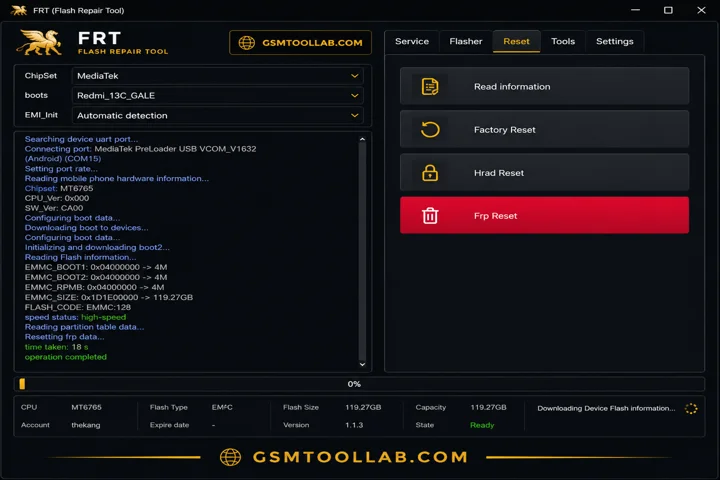
What is the FRT Tool?
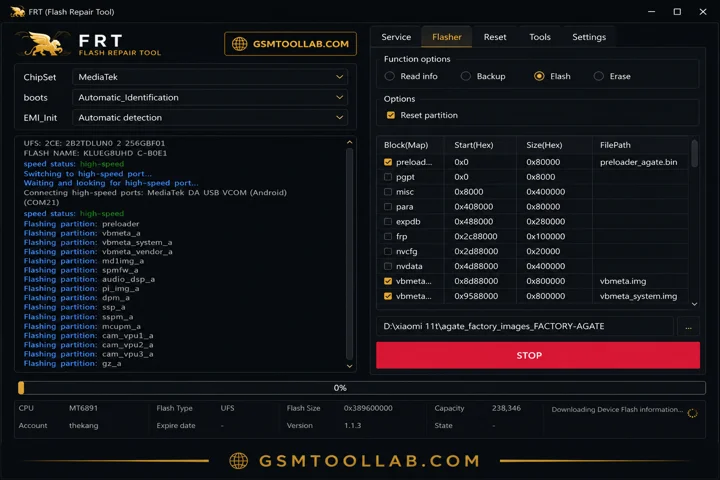
FRT Tool 1.7.5 is a window based and is designed to repair Android smartphones. It is also called a flash repair tool. It helps to remove the lock screen, firmware flash, remove FRP, and install custom ROMs. Flash Repair Tool uses a wide range due to its regularly updated features and simple navigation. The tool use protcole of ADB( Android Debug Bridge),fastboot, and download mode.
Key Features Of FRT Tool 2026
FRP Reset
You can just click to repair your Android Google factory reset protection if you have forgotten your Google account or unavailable.
Firmware Flashing
The FRT tool helps to install custom ROMs on Qualcomm and MediaTek. It can resolve issues like reboot loops, bugs, and update the Android.
Backup & Restore
This feature will ensure your important data is safe and secure in your device. When you perform a firmware partition, this feature always keeps your data safe.
RPMB
The FRT tool offers access to replay a protected memory block to the user to perform a backup, erase the data, and revert.
Super IMG Packing
The tool provides multiple partitions in a single image for easy flashing and ROM development.
Reset Partition Tools
You can reset the Reset Modem, Reset FRP, and Reset RPMB, and enable your Android to use like a new one.
Qualcomm & MTK Enhancements
The devices run on Qualcomm and MediaTek can be reset to backup or when the password is forgotten; all issues can be solved.
User-Friendly UI
It has a simple and easy dashboard to operate, so if you are a beginner or experienced, you can use it with just a few clicks.
Fastboot & ADB Functions
This tool supports two important modes, fastboot and ADB. These modes are used for the rebot bootloader, mi account removal, wipe data, and more.
Multi-Brand
This tool is not only for one Android brand, but it also supports multiple brands like Xiaomi, Samsung, Oppo, and Tecno.
IMEI & Network Repair
If you have an issue with the IMEI or want to change the IMEI, now you can with the help of the FRT tool in a few clicks. It can also solve your android network basebamd errors.
Lightweight and Fast-Executing
It uses minimum resources to develop, which is why it has a lightweight and fast repair process.
Pros and Cons
Pros:
- FRT Tool provides unlocking, flashing, resetting, and partitioning features in one place.
- Single-click FRP bypass supports many Android phones, helping technicians complete tasks quickly and efficiently.
- Supports major chipsets such as MediaTek, Qualcomm, and UNISOC, including many 2026 devices.
- It can reset important partitions to repair system and network problems.
- The tool can extract OFP firmware files for MTK and Qualcomm devices.
Cons:
- This Tool feature is available only on Windows PCs and does not support macOS or Linux.
- Users need to install USB drivers manually, which can be confusing for beginners.
How to Install FRT Tool v1.7.5?
- Download the FRT Tool setup file from a trusted source, the official website.
- Right-click the downloaded file and select “Extract Here” or “Extract to Folder” using WinRAR or 7-Zip.
- Some antivirus programs may detect GSM tools as false positives, so temporarily disable your antivirus before installation.
- Install all required Android USB drivers and any device-specific drivers if needed.
- Right-click on FRT Tool.exe and select “Run as Administrator.”
- Connect your Android device to the PC using a USB cable and enable USB Debugging if required.
- Select the correct firmware file or operation and begin the flashing or repair process.
Download Information
- File Version: V1.7.5
- File Size: 159.32MB
- Download Link👇
File Details
- File Type: ZIP / RAR Compressed File
- Extraction Tool: Use WinRAR or 7-Zip to extract files
- Supported OS: Windows 7 / 8 / 10 / 11 (32-Bit & 64-Bit)
Final Verdict:
The RFT tool is a multifunctional and reliable software for mobile repair technicians or owners. This tool offers all repairing options and removes restrictions like FRP, Mi account, Google account restriction, firmware flash, and more. If you are a beginner or an expert, you can operate the tool. So you can download the RFT tool from our website and repair your Android smartphones.
Frequently Asked Questions (FAQs)
What Is Frt Tool Used For?
FRT Tool helps flash firmware, remove FRP locks, reset devices, and repair IMEI-related issues.
Which Chipsets Are Supported By Frt Tool?
FRT Tool works with MediaTek and Qualcomm devices and supports OFP extraction features.
Does Frt Tool Support Frp Reset On Android Phones?
FRT Tool can remove FRP locks from supported Android devices.