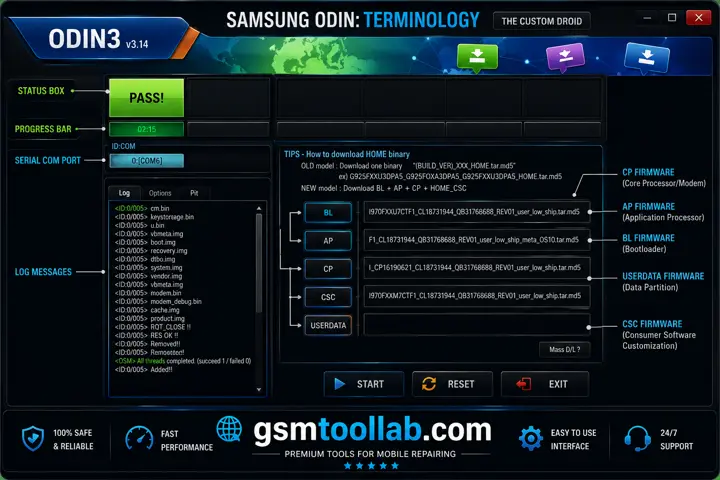
The Odin Tool is a Windows-based program for repairing Samsung smartphones and tablets. It can perform functions such as flashing firmware, custom recoveries, and installing custom recovery images. The download mode is making the tool fully functional for Samsung’s all models to stock firmware, which is necessary for the device.
Also Check: SamFirm Tool
What is the Odin Tool?
Odin Tool is a small portable software that can run on a computer to repair Android smartphones sumsung and tablets. This tool is used to unblock the device so new software can be installed in a Samsung device. It supports only Samsung smartphones and tablets.
Key Features Of Odin Tool 2026
Flash Firmware
Installing the older or new version of the firmware tool is necessary for this purpose. You can use the Odin tool to flash firmware from a Samsung device.
Custom ROM
You can install custom ROMs with the help of this tool, and it will allow you additional features, customization, and enhancement in the stock firmware.
Flash Recovery
Device backup, reset, and updates can be useful for smartphones; the Odin tool can flash a custom recovery for Samsung devices.
Flash Kernel
If you want to increase the features or make it more performance you should use this tool, and this will solve this problem in just a few clicks.
Root Package
Users can gain super privilege with the use of the Odin Tool and the flash root package to repair the device.
Pros And Cons
Pros
- Widely used for flashing Samsung firmware
- Can recover soft-bricked Samsung devices
- Supports a wide range of Samsung models
- Allows advanced customization with custom recoveries
- Reliable tool for firmware installation and updates
Cons
- Not officially supported by Samsung
- Incorrect use may cause device issues or warranty loss
- Requires technical knowledge for safe operation
- Download sources may not always be reliable
How To Download and Use Odin Tool v3.14.4?
Step 1:
Download the Odin Tool from a trusted or official Website.
Step 2:
Extract the downloaded ZIP or RAR file using WinRAR or 7-Zip.
Step 3:
Install the required Samsung USB Drivers on your computer.
Step 4:
Open the extracted folder and run Odin.exe as Administrator.
Step 5:
Turn off your Samsung device and boot it into Download Mode.
Step 6:
Connect the device to your PC using a USB cable.
Step 7:
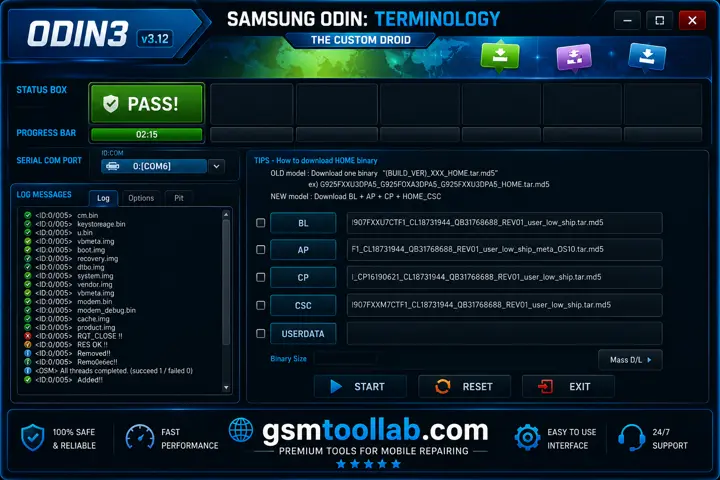
Wait for Odin to detect the device. The ID: COM box should turn blue.
Step 8:
Click the AP/PDA button and select the firmware file.
Step 9:
Verify the selected firmware and Odin settings.
Step 10:
Click Start to begin the flashing process.
Step 11:
Wait until Odin displays PASS! and the device restarts automatically.
Download Information
- File Version: v3.14.4
- File Size: 4.8 MB
- 🗝File Password: 123
- Download Link👇
Conclusion
The Odin Tool is most effective for major issues in Samsung devices, such as flash firmware. It is the best utility for technicians to face problems in Samsung smartphones and tablets. The developer makes regular updates to the tool, which make it more functional for users.
Recently Asked Questions (FAQ’s)
Is Odin Tool safe to use?
Yes, manually updating or restoring your Samsung device with the correct stock firmware is generally considered a safe method. However, flashing incorrect or unverified firmware can cause serious device issues. Always back up your data and ensure the firmware matches your exact device model before proceeding.
What is flash lock in Odin?
Flash Lock is a legacy option in Odin that controls flashing permissions on supported Samsung devices. When enabled, it allows Odin to communicate with the device and perform firmware flashing operations.
Will Odin void my device’s warranty?
Flashing custom recoveries, rooting packages, or modified firmware can trigger Samsung Knox and increase the flash counter, which may void your device’s warranty. However, flashing official stock firmware that matches your device model and carrier usually does not affect Knox or the flash counter.