Getting stuck on Google account verification or screen locks is very tough to handle for new users or even expert technicians. The Android Fastboot Reset Tool offers the best solution for screen lock removal, Google account verification, Mi Cloud removal, FRP bypass, and bootloader unlocking. The tool supports Qualcomm, MediaTek, and SPD devices. It supports multiple brands like Xiaomi, Huawei, Oppo, Samsung, and Motorola.
You Can Also Check: Android Multi Tool
What is the Android fastboot reset tool?
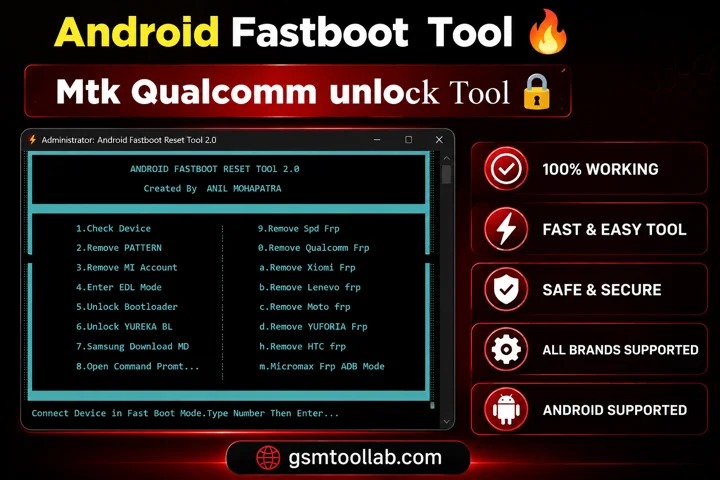
Android Fastboot Reset Tool V2.0 is an effective software for unlocking mobiles and bypassing FRP. If you have forgotten your passwords, pins, or pattern, you can unlock the device with the help of this tool. Every user can handle Qualcomm and MediaTek devices with EDL and download modes. You can use it easily without prior knowledge of the equipment. This tool can prevent loss of data from devices.
Unlocking Bootloaders And Advanced Fastboot Commands
The latest Android Fastboot Reset Tool supports both old and new Android devices for FRP removal, bootloader unlocking, and chipset-based repairs. It works smoothly on most Windows PCs and supports Qualcomm and SPD devices. Make sure USB drivers are installed before starting any repair process so the tool can detect the device correctly. For budget devices, options like Micromax FRP (ADB Mode) provide a quick and simple solution for FRP removal and device repair.
Key Features Of Android Fastboot Reset Tool 2026
The tool is a simple and powerful solution for MediaTek, Qualcomm, and SPD (Spreadtrum) devices. It is easy to use and does not require root access or special privileges.
- FRP Removal (SPD, Qualcomm, Xiaomi, Lenovo, Moto, HTC, Micromax)
- Remove Pattern Lock
- Remove MI Account
- Enter EDL Mode
- Unlock Bootloader
- Samsung Download Mode
- Fastboot Device Detection
- Open Command Prompt
- YUREKA Bootloader Unlock
- Micromax FRP via ADB Mode
How To Download And Use Android Fastboot Reset Tool?
- Download and extract the Android Fastboot Reset Tool from the official website ZIP file on your PC.
- Open the extracted folder and run the tool executable file.
- Boot your Android device into Fastboot Mode.
- Connect the device to your PC using a USB cable.
- Type 1 and press Enter to check device connectivity.
- Select the required operation by entering the related number or letter.
- Wait for the process to complete, then disconnect and restart the device.
Download Information
- File Version: V2.4.1
- File Size: 4.57 MB
- 🗝File Password: 123
- Download Link👇
Final Verdict
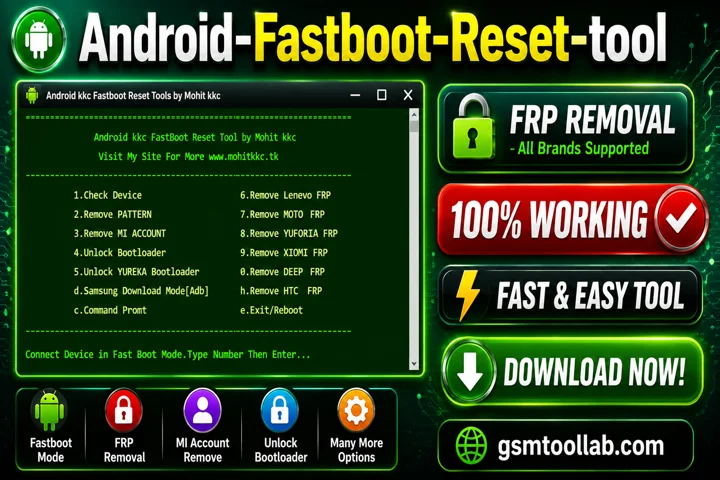
The Android fastboot reset tool deals with screen unlocks, and mi account remove fro android smartphones. You can read your data with bootloader unlock. This tool offers FRP bypass, Google account verification removal, screen unlocks, and bootloop errors. It uses Qualcomm and download modes for handling different devices. If you are a beginner or an experienced technician, you can download the tool from our website and solve your problem in just a few clicks.
Recently Asked Questions (FAQs)
Can I Use Android Fastboot Reset Tool Software To Bypass A Xiaomi Account Lock?
Yes, it includes dedicated options for Mi Account removal, EDL Mode access, and safe bootloader unlocking without requiring advanced technical skills.
Does It Support Removing FRP on Different Mobile Brands?
Android Fastboot Reset Tool supports Qualcomm, SPD, Lenovo, Motorola, and HTC FRP removal using specialized repair and bypass functions.
Can It Fix A Phone That Won’t Turn On At All?
The tool can recover phones that still enter Fastboot Mode. However, completely dead hardware devices usually cannot be repaired using software tools.
Is It Easy To Switch My Samsung Device Into Flashing Mode?
The Android Fastboot Reset Tool can enter Samsung Download Mode with one click and also provides direct access to Command Prompt for manual repairs.