The TPS tool is a Windows-based software tool that solves many issues with MediaTek and Qualcomm-supported devices. This tool offers flash firmware, screen unlockers, and FPR removals. The tool works with Android devices using ADB and bootloaders. Sometimes files get corrupted; you can flash and also change or repair the IMEI of Android smartphones.
You Can Also Check: Android Multi Tool
What is the TPS Tool v3.1?
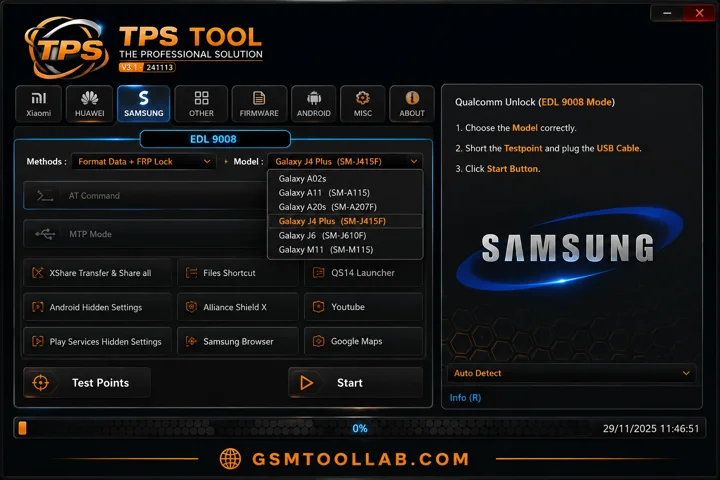
The TPS tool v3.1 is window based deigned to help FRP removal, firmware flash, IMEI repair, screen unlocks, bootloader unlocking, and data wiping. It uses different modes like ADB mode, download mode, & mtk spd and Qualcomm. It supports many devices such as Samsung, Xiaomi, Vivo, Oppo, Réaume, Infinix, Tecno, Huawei, and more.
Key Features Of TPS Tool 2026
FRP Unlock
This tool is most reliable for factory reset protection removal from Android smartphones. It uses both ADB and fastboot mode to repair the device.
Screen Lock
If you have forgotten the pattern, PIN, or password, you can unlock the screen with the TPS tool. You can just in handy trick, not lookout complet.
Factory Reset / Data Wipe
The tool solves the problem of hanging, crashes, and boot loops of Android devices and wipes all data from Android smartphones in just a few clicks.
Bootloader Unlock
It helps to lock or unlock devices and make the process of flashing, as well as create a custom map for flashing in devices.
ADB & Fastboot
With the help of ADB and fastboot, you don’t need to connect pc with Android, you can just download and use the modes of the tool and solve your problem in one click.
Firmware Flashing
When files get ruined on the mobile, you can flash firmware to fix it also be caused by malware on the device.
Driver Installation
In this tool, drivers are used like Qualcomm, MediaTek, ADB, and SPD chipsets to help the tool connect between pc and Android.
Device Information Reader
It can read the model number, Android version, IMEI number, and chipsets, which help to unlock the device.
Simple User Interface
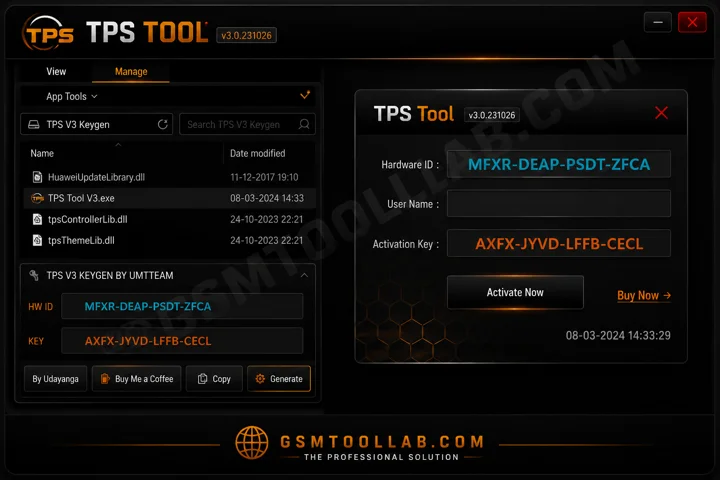
If you are a beginner or an experienced technician, you can use the tool due to its simple navigation in the dashboard. It has minimam resources, and that’s why it’s performing quickly.
Free and Portable Utility
You can use it for free, and no need to install any other paid sources for repairing a mobile to use the TPS Tool.
Wide Device Compatibility
There are many brands supported with this tool, not only a single branded supper, but it supports multiple brands like Xiaomi, Samsung, Oppo, and Tecno.
Stable and Secure Operations
The TPS tool always ensures that users’ devices are not lost due to firmware or hardware issues. In our recent info, at this time, any problems come.
Pro And Cons
Pros:
- The TPS Tool is easy to use
- Works offline
- Supports many devices
- Receives regular updates.
Cons:
- Requires technical knowledge to use
- Not official software
- May trigger false antivirus alerts
- Limited documentation available
How To Download the TPS Tool V3.1?
- Step 1: Download and install the tool on your PC from the official website.
- Step 2: Connect your Android device to the PC and install the required Android drivers if needed.
- Step 3: Tap Emergency to open the factory default menu or Preloader Mode.
- Step 4: Open the tool and click Remove FRP under the Trial Mode tab.
- Step 5: Wait a few minutes while the device reboots automatically. After rebooting, the FRP lock will be removed.
Download Information
- File Version: V3.1
- File Size: 189.47 MB
- 🗝File Password: gsmtoollab.com
- Download Link👇
File Details
- File Type: ZIP / RAR Compressed File
- Extraction Tool: Use WinRAR or 7-Zip to extract files
- Supported OS: Windows 7 / 8 / 10 / 11 (32-Bit & 64-Bit)
Final Verdict:
The TPS Tool is designed for repairing Android smartphones that support Qualcomm, MediaTek, SPD, and ADB chipsets. It can easily solve issues such as firmware flashing, screen unlocks, Mi Account removal, and IMEI repair or change. If the user is a beginner or an expert, they can use it easily with a few clicks. You can download the TPS Tool from our website and repair your Android smartphones without any hurdles.
FAQ’s
Is the TPS Tool free?
Some versions are free, while others may require registration depending on the source.
How to check for TPS?
Check the TPS sensor with a multimeter. Smooth voltage changes mean the sensor is working properly.
Can beginners use the TPS Tool?
Yes, the tool is easy to use for beginners.
Is this tool safe?
Download the tool only from trusted sources to stay safe.