The MRT Tool is a powerful pc software for Android smartphones and is designed to remove all restrictions for unlocking the screen, FRP removal, reading information, and IMEI repair. It helps in Mi Cloud disable and bootloader unlocking using ADB and fastboot. This tool supports different devices via Qualcomm, MediaTek, ADB, and SPD. You can from firmasware flashing to remove FRP in just a few click wether you are a beginner or an expert technician.
You Can Also Check: FRT Tool
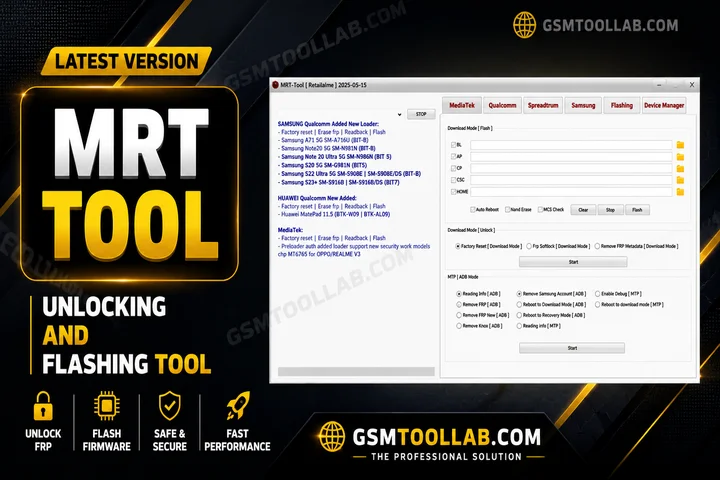
What is the MRT Tool v6.1?
MRT Tool v6.1 is free software for the repair and maintenance of Android smartphones. This tool is use for factory reset protection removal, Mi Cloud removal, IMEI repair, screen unlocks, and flash firmware. The tool is used for Android and iOS. It supports many brands like Xiaomi, Redmi, Samsung, and Tecno. This tool is use by a new user or an expert in this technical field.
Disable Or Unlock Mi Cloud Easily Using MRT Tool
Mi Cloud can sometimes lock Xiaomi devices even after a factory reset, preventing users from signing in. MRT Tool V6.1 includes built-in features like Disable Mi Cloud and Unlock Mi Cloud, which remove associated account data safely. It also supports Erase FRP Meta and Save Format Meta for secure data clearing while maintaining system stability.
This feature is especially useful for technicians working with Xiaomi, Redmi, and Poco devices. Users can connect the device, select the correct chipset, such as MediaTek or Qualcomm, and perform the Mi Cloud unlock process without root access.
Key Features Of MRT Tool 2026
FRP Lock Bypass
You can save time, and when you get stuck in FRP, you can bypass the FRP and make your mobile fresh.
Password/Pattern Unlock
Forget you password, pin or pattern but now you just in few clicks to remove screen locks.
Bootloader Unlock/Relock
This tool will help you install custom ROMs and lock pr relock the bootloader to repair Android smartphones.
Firmware Flashing
The firmware flash feature is reliable for all Android and iOS users. You can flash the firmware files if you get stuck in a loop error.
IMEI Repair
In some areas, this step is legal and requires making an IMEI repair or change. With the help of this tool, you can repair the IMEI and make your Android new.
What’s New in MRT Tool v6.0.0?
- Full Android 15 support for the latest devices.
- Added support for more models, including Oppo Reno, Vivo X series, Xiaomi, and Realme devices.
- Faster flashing speed for improved efficiency.
- Stable USB connection with fewer disconnection issues.
- Updated drivers for better compatibility with modern systems.
How To Download MRT Tool v6.1?
- Download the setup file from the official or trusted source Website.
- Activate the tool using your pass.
- Extract the file using WinRAR or 7-Zip.
- Install the required drivers for proper device connection.
- Run the setup file and finish the installation process.
- Connect the MRT Dongle to your PC.
- Activate the software using key.
Download Information
- File Version: V3.1
- File Size: 112.40 MB
- 🗝File Password: None
- Download Link👇
Final Verdict
The MRT tool is multifunctional, and it helps to remove lock screens, FRP bypass, Mi Cloud disable, IMEI repair, flash firmware, and flash a dead phone. It combines with Qualcomm, Meditech, SMD, smp and ADB (Android Debug Bridge). This tool is very easy to use due to its simple navigation and minimam resource usage. You can download the MRT tool and save time to repair.
FAQ’s
What Is The Main Use Of MRT Tool?
MRT Tool helps flash, unlock, repair, and maintain Android devices with different chipsets.
Can Mrt Tool Remove Frp Without Data Loss?
The tool can remove FRP locks safely without affecting important system files.
How Often Is MRT Tool Updated?
The tool gets regular updates with new features, bug fixes, and Android security support.