Have you forgotten your Google account or faced a firmware issue and locked your mobile phone? No need to worry, Chimera Tool can solve this problem. This tool can make it quick and easy to operate your Android smartphone. It can support different devices like Samsung, Huawei, Xiaomi, and more. Whether you are a beginner or an experienced user, you can use and repair your phone.
You Can Also Check: SamFw FRP Tool
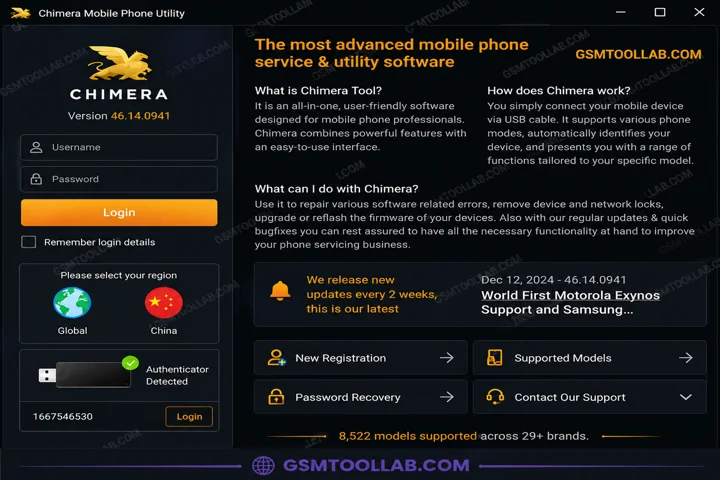
What is the Chimera Tool?
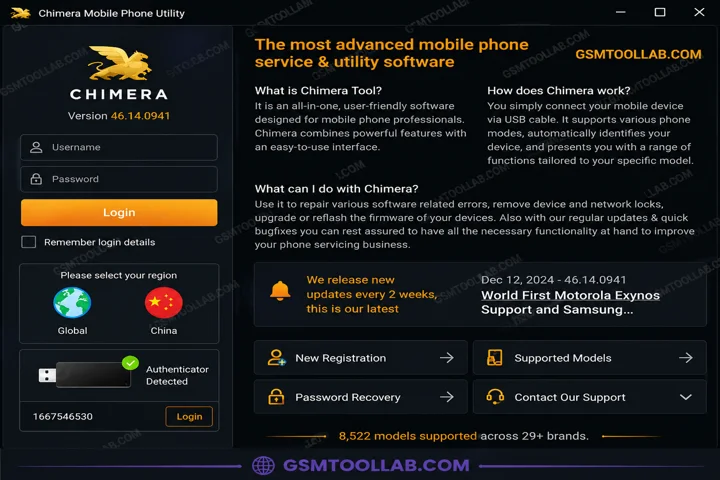
Chimera Tool is a Windows-based tool and is designed to repair Android smartphones. This tool helps fix Qualcomm-, MediaTek-, and SPD (Spreadtrum)-based Android smartphones. The Chimera Tool is used for FRP removal, flashing firmware, IMEI repair, removing screen locks, MDM removal, and Mi Account removal. It can also install custom ROMs.
Features of Chimera Tool 2026
Installer Application
This tool comes with a file. Before using it, you have to download and then install it to repair your mobile phone.
Hardware
The Chimera Tool does not come with a hardware-like box or dongle. You just need a USB to connect the Windows to the mobile for various tasks to repair the mobile.
Easy to use UI
The tool has a detailed interface and is easy to use for every user. Due to its simple ui it can support 32 or 64-bit Windows OS.
FRP/MDM Bypass
You can bypass factory reset protection or MDM locks, and it supports different modes like eub and download mode.
Flash Firmware
Chimera Tool allows users to flash firmware on SPD, Qualcomm, and MTK-based Android devices easily.
IMEI / MAC Repair
You can restore corrupted or lost IMEI and sometime mac addresses to verify the owners of the device.
Root / Bootloader Management
This tool performs root or unroot and bootloader lock or unlock as well. When you face the issue in the bootloader, you can unlock and make your device new.
Safety Tips When Using Chimera Tool
If you decide to use Chimera Tool, follow these important safety tips:
- Download the tool only from the official website. Avoid cracked versions because they may contain malware or damage your device.
- Understand your license and credits before use. Do not use shared or rented accounts.
- Learn the correct phone modes, such as EDL, EUB, and Download Mode, and install the proper USB drivers.
- Always back up your data before flashing, IMEI repair, or making major changes.
- Only unlock or repair devices you own or have permission to work on.
- Keep the tool updated to support the latest Android versions and devices.
Pros And Cons
Pros:
- The tool supports many Android devices and chipsets.
- ChimeraTool can create custom tools for multiple platforms.
- This tool can unlock, flash, root, and repair Android devices.
Cons:
- You need a paid license and credits to use advanced features.
- The tool works mainly on Windows, not properly on macOS or Linux.
- Wrong use of IMEI repair tools can lead to legal problems.
How to Use Chimera Tool v46.14.0941?
- Download and install Chimera Tool v46.14.0941 on your PC from the official website.
- Connect your device via USB and enable USB debugging if needed.
- Open the tool and log in with your Chimera account.
- Select the required operation, such as unlock, flash, or repair.
- Follow the on-screen instructions to complete the process.
- Restart your device and check the changes after completion.
Download Information
- File Version: v46.14.0941
- File Size: 29.06 MB
- File Password: gsmtoollab.com
- Download Link👇
File Details
- File Type: ZIP / RAR Compressed File
- Extraction Tool: Use WinRAR or 7-Zip to extract files
- Supported OS: Windows 7 / 8 / 10 / 11 (32-Bit & 64-Bit)
Final Verdict:
Chimera Tool is designed to repair Android smartphones and offers advanced functions like unlocking, FRP bypass, IMEI repair, firmware flashing, root management, and screen locks. This tool has a simple and easy interface; whether you are a beginner or an expert, you can use it smoothly. This tool is updated regularly and supports the latest devices and security patches. If you want to repair your device, you can download Chimera Tool from our website and solve your problem in just a few clicks.
FAQ’s
Is Chimera Tool Safe?
Chimera Tool is powerful, but users should only use official downloads and licenses, avoid cracked accounts, and never allow unsafe remote access.
What can I do with it?
You can unlock phones, flash firmware, repair IMEI numbers, and perform many other repair tasks.
Are there any risks involved in using Chimera Tool on Linux via Wine?
Chimera Tool can run on Linux using Wine, but it is not recommended because it may not work reliably.
What phones does it support?
This tool supports phones from many manufacturers, including Samsung, LG, Motorola, Sony, and more.