Sometimes, mobile factory reset protection gets stuck on Google account verification, then needs to be removed. The SamFw FRP Tool is designed to help users solve this problem. This tool is for Android 14 and newer versions. You can get your device backup without losing your data.
Also Check: TFT Unlock Tool
What is SamFw FRP Tool?
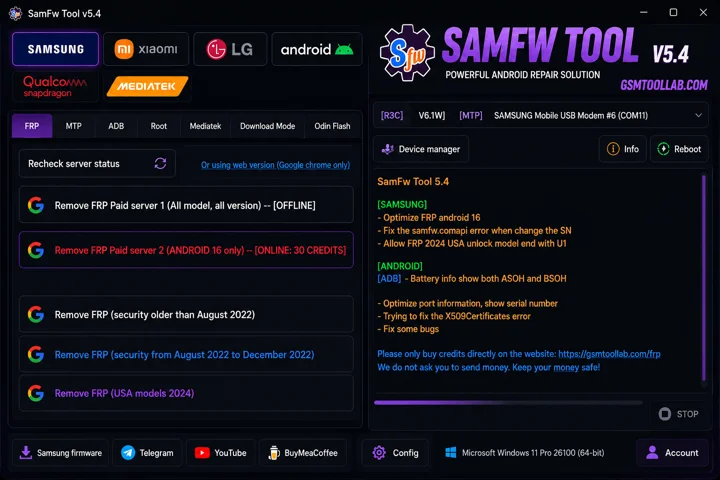
SamFw FRP Tool is window based software that is used to bypass the FRP mostly in Samsung’s all models. This tool is now used for firmware flashing efficiently with just a few clicks. Also, The SamFw FRP Tool uses ADB (Android Debug Bridge) mode, which is a secret method for getting your device back on the Google account.
Why Choose SamFw Tool V5.4?
SamFw Tool 5.4 is a useful tool for bypassing FRP locks on Samsung devices. Its simple and user-friendly interface makes it easy for both beginners and technicians to use. The tool supports many Samsung models, helping users regain access to their devices quickly and efficiently.
Version 5.4 also offers improved speed, better error handling, and enhanced diagnostic features. Also, These updates make the FRP bypass process faster, smoother, and more reliable for Samsung users.
Key Features of SamFW Tool
FRP Bypass
The SamFw FRP Tool removes the Google account from Android smartphones and makes it new for users.
Security Patch
This tool is redesigned for Samsung firmware for all versions. Therefore, it supports the latest security patches for all Samsung models.
ADB-Based Operations
ADB ( Android Debug Bridge) is a mode to bypass the factory reset protection in Android. Also, It works to connect pc with an Android to repair mobile phones for this purpose.
Faster and more Efficient
This tool offers quick and more efficient services to repair Android smartphones. You can remove restrictions from Android in a few seconds.
Additional Android Utilities
In this tool, robots are incorporated to make this process quicker and more efficient. Additionally, it is also more flexible than other tools.
Device Detection
The tool uses an auto system to detect devices for repairing the system. You can flash firmware or remove FRP. It is also automated by this tool.
Real-Time Logs
You can push a live comment to solve the problem and get help at the time. Also, You can detect troubleshooting on time and to comment to remove.
Enhanced User Interface
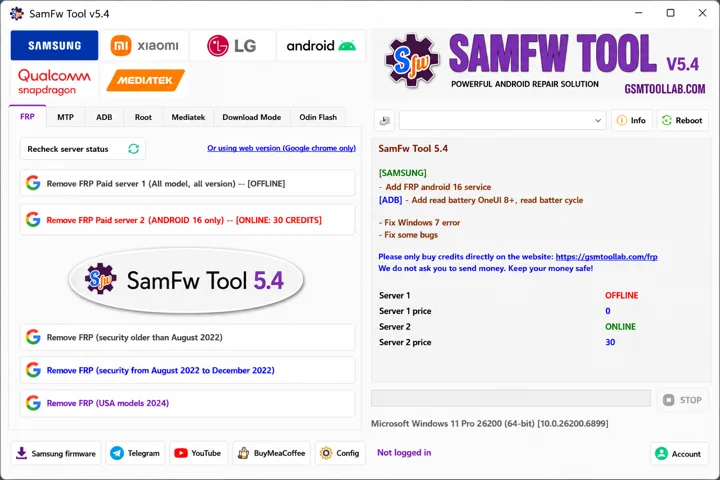
If you are a beginner or an experienced user, you can use this tool in just a few clicks. Due to its light weight, this tool performs quickly. So, It has a simple dashboard to operate the system.
Pro and Cons
Pros:
- SamFw FRP Tool is available for free use.
- The tool works well for FRP bypass on older Samsung phones.
- Also, This version performs FRP bypass quickly and improves work speed.
- The tool is easy to use and usually detects devices without problems.
Cons:
- The tool may not work well on new Samsung phones with updated security.
- Security bypass tools can be misused and may create privacy or data risks.
- On some devices, the FRP bypass process may fail or stop, requiring repeated attempts or extra manual steps.
SamFwTool v5.4 System Requirements
Minimum System Requirements
- Dual-core processor
- 2GB RAM
- 500MB free storage
- One or more USB ports
Supported Operating Systems
- Windows 10
- Windows 8.1
- Windows 7
Required Components
- Microsoft .NET Framework 4.5 or higher
- Samsung USB drivers installed
How To Download SamFw FRP Tool 5.4?
- Download the SamFw FRP Tool 5.4 setup file from the official website or a trusted source.
- Extract the ZIP or RAR file using WinRAR or 7-Zip.
- Open the extracted folder and locate the setup file.
- Install the required USB and ADB drivers.
- Run the setup file and follow the on-screen instructions.
- After installation, launch the tool as an administrator.
- Enable USB Debugging on your Android device from Developer Options.
- Connect the device to your PC using a USB cable and start using the tool.
After completing these steps, SamFw FRP Tool 5.4 will be ready to use.
Download Information
- File Version: v5.4
- File Size: 107.67 MB
- File Password: gsmtoollab.com
- Download Link👇
File Details
- File Type: ZIP / RAR Compressed File
- Extraction Tool: Use WinRAR or 7-Zip to extract files
- Supported OS: Windows 7 / 8 / 10 / 11 (32-Bit & 64-Bit)
Final Verdict
The SamFw FRP Tool is effective for FRP removal and unlocking Android smartphones. It has a user-friendly interface, which is why it is widely used. Any user can operate and solve the problem. You can download from our website and straightforward FRP removal. Utilise the advanced ADB mode to connect the device with the tool.
FAQ’s
Is it safe to use the SamFw FRP Tool version 5.4?
SamFw FRP Tool works for many users, but antivirus software may sometimes flag it as suspicious.
Is SamFw free to use?
SamFw FRP Tool is a free tool for removing FRP locks.
Can the SamFw FRP Tool support Android 14 and later?
SamFw Tool works better on Android 13 or older devices, but Android 14 support is limited.
Can the SamFw FRP Tool root Android?
SamFw FRP cannot do that directly, but it can remove some Samsung restrictions.