When you forget the Google account of your Huawei device or lock the screen by mistake, you don’t need to worry about that because you have the Huawei FRP tool to unlock and bypass FRP. This function performs with fastboot and BROM mode to repair a Huawei device. The MediaTek chipsets are used for communication between the tool and the Huawei device to enable repair options.
Also Try: MRT Tool
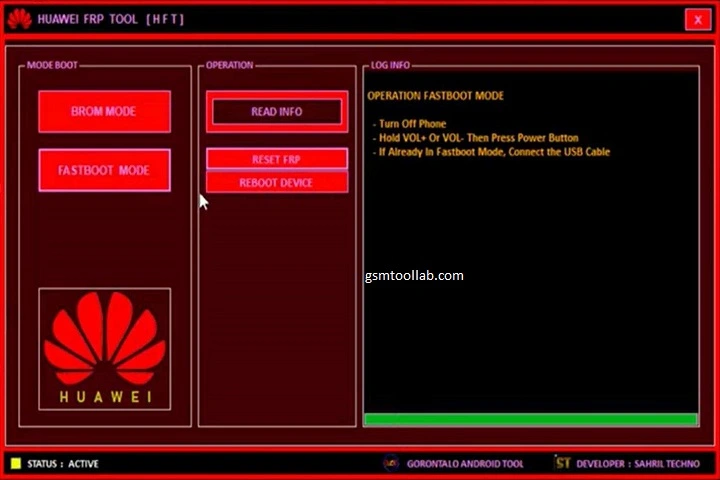
What is the Huawei FRP Tool?
Huawei FRP Tool is a prebuilt software to repair all Huawei models for Google account verification issues and more. It uses different modes like fastboot mode, BROM mode, and boot mode. If you have forgotten your passwords, pins, or patterns, you can unlock the screen with this tool. In this tool, you just need the communication between the device and the tool, install only USB drivers, and use MediaTek chipsets for this purpose.
Key Features Of Huawei FRP Tool 2026
FRP Removal
Sometimes the phone is stuck after a reset, and to give the Google account used for the first time attached to the device. With this tool, you can bypass FRP and make your mobile new for you.
Multiple Version Compatibility
It supports not only one model of huvaiew it also gives a solution for most versions of Huawei, and other devices can be solved by this tool.
Simple Dashboard
It has simple navigation in the dashboard and is easy to operate for every kind of user, whether they are new or experts in this field.
No technical knowledge
The tool has minimal resource usage and is very easy to operate with just a few clicks. If you have no prior knowledge of the tool, you can use this tool easily.
Modes
It uses different modes, like Boot mode. Fastboot mode and BROM mode. These modes help in the communication of tools and devices.
Lightweight
The developer made this tool lightweight, and not much space is required to run this program. This tool uses minimal resources and makes it user-friendly.
Screen unlocks
If you have forgotten your patterns, pins, or passwords, with the help of Huawei FRP Tool, you can unlock the device in a quick way.
Pros And Cons
Pros:
- Quick one-click Huawei FRP unlock process
- Restores full access to supported Huawei devices
- Compatible with most Android versions (6.0 and later)
- Simple and user-friendly interface
- Fast FRP removal with minimal steps
Cons:
- No macOS version available yet
- Not compatible with HarmonyOS devices
- Limited platform support compared to some alternatives
How To Download Huawei FRP Tool v1.0?
- Download the Huawei FRP tool from a trusted or official Website.
- Install the required Huawei HiSuite package and USB drivers.
- Open the FRP tool on your computer.
- Connect your Huawei device using a USB cable in the required mode.
- Select your device model from the list.
- Click the appropriate option and follow the on-screen instructions.
Download Information
- File Version: V1.0
- File Size: 57.91 MB
- 🗝File Password: None
- Download Link👇
Conclusion
Huawei FRP Tool is essential for Huawei device owners when they forget their password, pins, or pattern. They can unlock the device. If they forget their Google account after resetting the device, they can now bypass the FRP with the help of the Huawei FRP Tool. The tool offers FRP unlocks, screen unlocks, no technical complexity, and a user-friendly interface. You can download the tool from our website and make your mobile new in just a few clicks.
Frequently Asked Questions (FAQ’s)
What is the best tool for Huawei FRP?
While several Huawei FRP unlock methods and tools are available, some APK-based solutions can be risky and difficult to use. UltFone FRP Bypass Tool is often recommended because of its simple interface and reliable FRP removal process.
How do I FRP unlock my phone?
Factory Reset Protection (FRP) is a security feature on Android devices that helps prevent unauthorized access after a factory reset. To unlock an FRP-protected device, users typically need to sign in with the Google account that was previously synced to the phone.
How do I unlock Huawei if I forgot my password?
If you forget your Huawei phone password, the official method to regain access is to perform a factory reset. This process restores the device to its default settings and removes all personal data stored on the phone.
What is the FRP code for Huawei?
Huawei devices use Factory Reset Protection (FRP) to prevent unauthorized access after a factory reset. If you are locked out of your device, use the official account recovery options or contact Huawei support for assistance.