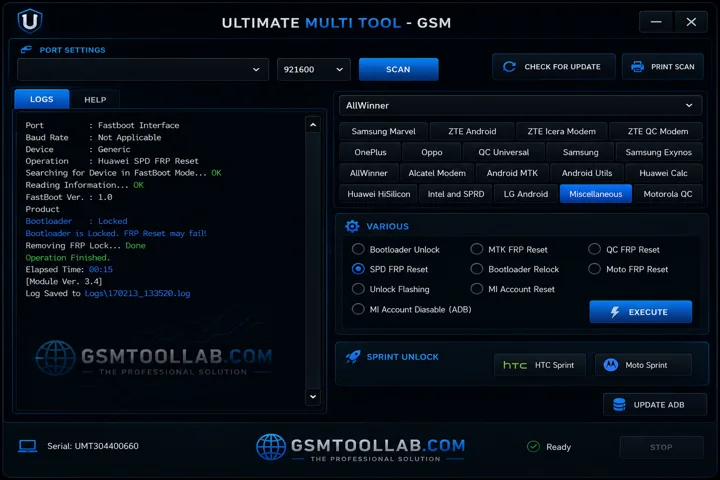
The UMT Tool is a Windows-based software that is used to repair mobile phones. This tool offers various services for Android smartphones, such as flashing firmware, unlocking screens, installing custom ROMs, and repairing IMEI numbers. It also offers backup data and IMEI changing options in almost all brands like Xiaomi, Redmi, Huawei, Oppo, and Samsung. You can get a zip file with an installation guide and essential USB drivers.
You Can Also Check: BFT v1.8 Flash Tool
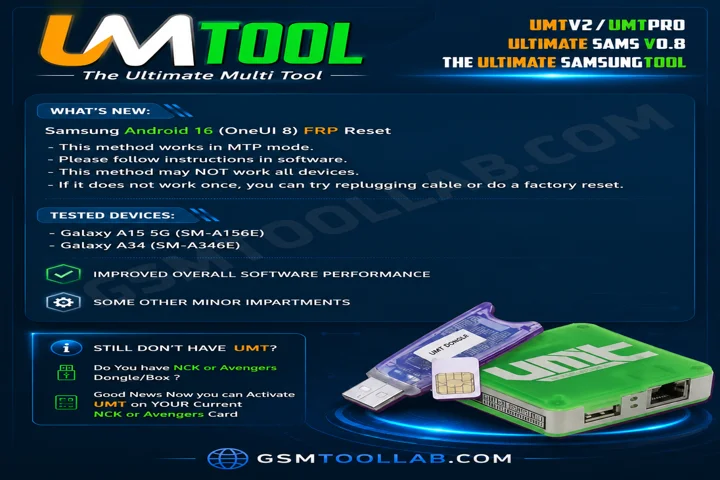
What is the UMT Tool?
Ultimate Multi Tool is a software to repair mobile and it allows unlocking Qualcomm, Mediatek, and Silicon Power Android smartphones. It also helps remove factory reset protection when you forget the Google account. This tool is very easy to use due to its minimal resources and light weight.
Key Features Of UMT Tool 2026
Simple interface
It has simple navigation in the dashboard, which is why it’s easy to use for every user. Whether they are new or experts in the repair field.
Qualcomm and MediaTek
The use of Qualcomm and MediaTek makes it connected to a computer for repairing Android smartphones of all models, from Xiaomi to Samsung.
Unlock screen
If you have forgotten patterns, pins, or passwords, you can unlock the screen with the UMT tool in just a few clicks.
FRP Removal
When you get stuck in the Google account verification after the reset mobile. You can use the UMT tool to unlock the mobile and bypass FRP.
Factory Reset & Safe Format
You can reset the device without touching any files, as all files are safe. The UMT Tool is used for making a safe process.
IMEI Repair
The IMEI repair is a very crucial step in mobile repair because some brands do not allow the change or repair of IMEI. It supports changing or repairing IMEI on supported brands.
Boot Repair
This tool supports startup issues in Android and boot loop repair. The UMT QcFire Tool normally uses ADB (Android Debug Bridge) to repair boot errors.
Security Backup & Restore
When the factory reset is performed on a mobile, normally, data is removed, but this tool can back up and restore all files.
Auto Chipset Detection
It can detect MediaTek chipsets automatically. This tool is supported by Qualcomm, MediaTek, ADB, and SPD chipsets.
Improved Authentication Support
This tool supports new devices that are listed models. The tool is used for those who are more protected and are on the list.
Detailed Log Window
It shows all detailed information that is needed to fix the errors in the future, and also on time.
What’s New in 2026?
- Added IMEI repair support for Intel CPU devices, such as the ASUS ZenFone 5.
- Supports repair for both IMEI numbers.
- No need to wipe or reset the device before IMEI repair.
- Root required for Intel CPU devices.
- Android MTK devices do not require root access.
- Added IMEI repair support in Meta Mode.
- Backup NVM from a working phone.
- Repair Unknown Baseband using NVM backups.
- Improved NVM restore functionality.
Pros & Cons Of UMT Tool
Pros:
- UMT QcFire Tool supports many mobile brands.
- It can remove FRP, repair IMEI, and flash firmware.
- Also, Ultimate Multi Tool receives regular updates for new features and devices.
Cons:
- Requires dongle activation to use this tool.
- So, Requires technical knowledge to use this tool.
- Some tool features may be restricted in certain countries.
Safety Tips and Legal Considerations
- Always back up your device before flashing or performing an FRP reset.
- Use only official or verified versions of the latest UMT Pro update.
- Use the tool only for personal repair or authorized unlocking purposes.
- Follow local laws regarding IMEI repair and device unlocking.
- Avoid cracked or unofficial versions that may harm your device or computer security.
How To Download Ultimate Multi Tool v13.6?
- Install the software from the official website of a trusted source.
- Also, install MediaTek USB VCOM drivers.
- and connect the UMT dongle.
- Then connect your MTK device to start using the tool.
Download Information
- File Version: V3.1
- File Size: 102.32 MB
- 🗝File Password: gsmtoollab.com
- Download Link👇
File Details
- File Type: ZIP / RAR Compressed File
- Extraction Tool: Use WinRAR or 7-Zip to extract files
- Supported OS: Windows 7 / 8 / 10 / 11 (32-Bit & 64-Bit)
Conclusion
The Ultimate Multi Tool is free and is designed to repair mobile phones with a window. It helps flash firmware, remove FRP, factory reset, unlock screen, and IMEI repair. It uses a driver in USB on supported MTK, ADB, and SPD. If you are a beginner or an experienced user, you can use this tool due to its simple dashboard to operate and repair mobile phones. Now you can download this tool from our website and repair your Android in just a few clicks.
FAQ’s
Which phone brands does UMT support?
Ultimate Multi Tool supports many popular brands like Oppo, Vivo, Xiaomi (Redmi), and Samsung, along with Qualcomm, MTK, SPD, and Unisoc chipsets.
Is the UMT tool safe to use?
Yes, for older Android versions up to Android 11, the UMT Pro Dongle can reliably remove FRP locks from many supported brands.
Can I use UMT without the physical dongle?
No. You must connect the UMT V2 or UMT Pro dongle to a USB port for the software to work properly.
How do I get the latest updates?
Open the Ultimate Multi Tool Support Access tool on your PC to view and download the latest versions of modules like QCfire and MTK.