The SamFirm Tool is a Windows-based program that allows you to download stock firmware for Android smartphones and tablets. If you forget your Google account when trying to unlock your mobile, you can use this tool to remove FRP. The tool offers firmware flash, screen unlocks, FRP removal, and other repair options.
Also Try: UMT Tool
What is the SamFirm Tool?
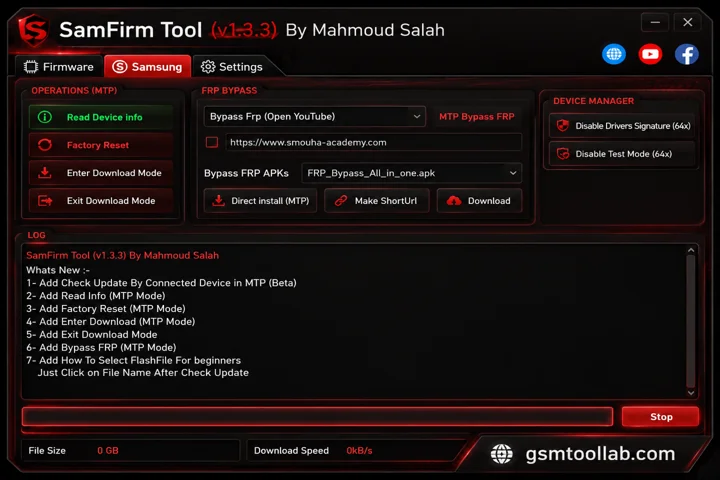
The SamFirm tool is specially designed for Samsung to remove FRP and install custom ROMs. Now it has all the utilities in one for repairing Android smartphones. It can download stock firmware for Samsung mobiles. The community has evolved, and this tool is lightweight; every user runs this tool, whether they are a beginner or an experienced technician.
Key Features oF SamFirm Tool 2026
Simplified UI
It has simple navigation in the dashboard to operate the software. If you are a new user, you can use this tool in just a few clicks.
Firmware Installation
The SamFirm tool helps you unlock the PRP from your device, and you can easily install the updated firmware.
Compatibility
This tool is Windows-based, and you can use this tool on all Samsung devices, mobiles, tablets, and wearables.
Portable application
You don’t need to install the application for this, you just run the program and update your device firmware in a quick way.
Lightweight
The tool is deigned in minimal resources, and that’s why it’s lightweight. It finds encrypted files and decrypts them in just a few clicks.
Multiple Option
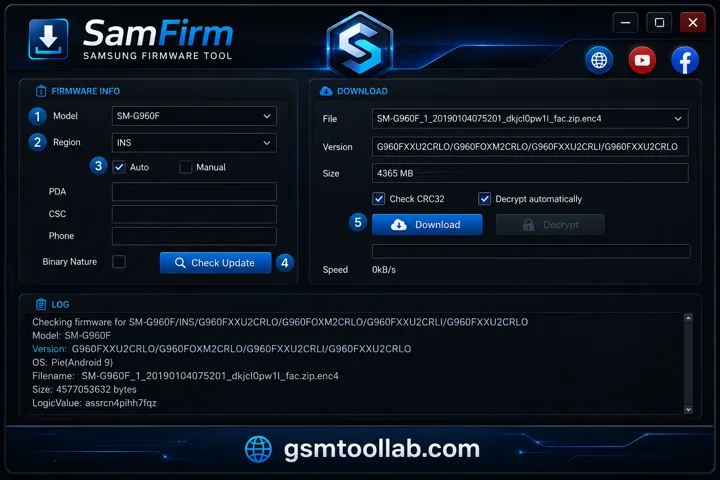
It has multiple options. If you want to search the model number and region code, you can put the PDA, CSC, and phone details to extract firmware files.
Auto Decryption
In this software no need to install any other software for flash firmware; it can auto-detect the decryption and flash firmware files.
Pros And Cons
Pros
- Free and easy-to-use Samsung firmware downloader
- Supports automatic and manual firmware downloads
- Beginner-friendly interface
- Compatible with many Samsung devices and regions
- Useful for emergency firmware recovery
Cons
- Available only for Windows operating systems
- Does not support advanced features like rooting or custom ROM installation
How To Use SamFirm Tool
Step 1:
Open the program and enter your Samsung device model and region.
Step 2:
Choose automatic or manual firmware download mode.
Step 3:
In manual mode, select the firmware version and region.
Step 4:
Click Check Updates to view available firmware files.
Step 5:
Click Download to start downloading the firmware.
Step 6:
After downloading, flash the firmware to your Samsung device if required.
How To Download SamFirm FRP Tool V3.3?
- Download and install the SamFirm Tool on your computer from the website.
- Open the tool after installation.
- Select your Samsung device model and region/country.
- Click the Start button to begin downloading the stock firmware.
- Wait for the firmware download to complete based on your internet speed.
Download Information
- File Version: v3.3
- File Size: 7.8 MB
- 🗝File Password: 123
- Download Link👇
Conclusion
SamFirm tool is built on window based fro repair android smartphones such as Xiaomi, Huawei, Nokia, Oppo, oppo and special Samsung models. It can decrypt all firmware files in just a few clicks. Due to its lightweight and simple navigation, every user can run this tool and keep their devices fresh. The tool offers firmware flash, FRP removal, Mi Account removal, and many more. You can download the SamFirm tool from our website and install custom ROMs and flash firmware files immediately.
FAQ’s
Is SamFirm safe to use?
Yes, SamFirm is a trusted tool widely used in the Samsung community. For safety and security, always download it from official or trusted sources like FileHorse.
Is SamFirm compatible with Mac or Linux?
Unfortunately, the tool is only available for Windows. Mac and Linux users must use alternative tools for Samsung firmware management.
Does SamFirm support all Samsung devices?
The tool supports many Samsung devices, but compatibility depends on firmware availability for specific models and regions.