TSM Tool 2.4.1 is a high-end Windows-based tool to repair mobile phones if you get stuck during Google account verification or screen locks. It helps in flash firmware, screen unlocks, IMEI repair, and MDM removal. It works on different devices from Xiaomi, Redmi, Nokia, Samsung, Qualcomm, and MediaTek-supported models. If you are looking for the best TSM tool, you can download it from our website safely.
Also Check: UMT Tool
What is the TSM Tool?
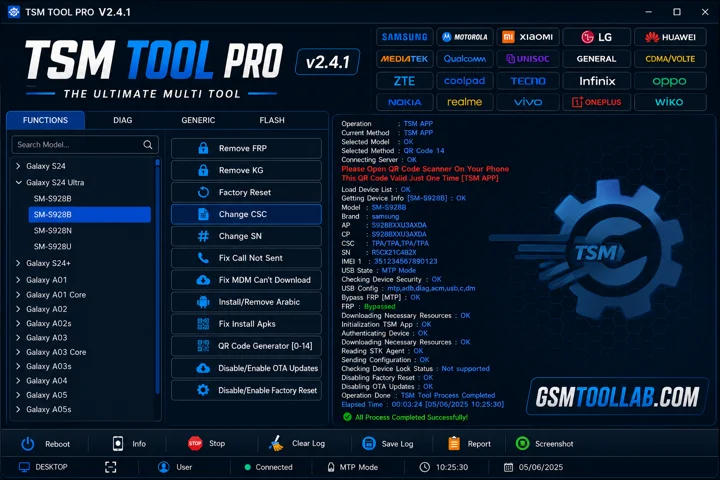
Turbo Service Mobile tool runs on pc and this is the safest tool to repair Android smartphones. This tool functions with ADB, fastboot mode, download mode, and chipset-specific modes. The tool is designed for devices like Motorola, Samsung, and Xiaomi models. It has a user-friendly interface due to its lightweight and minimal resources. It is all in one solution tool that can fix from FRP to IMEI repair.
Key Features Of TSM Tool 2026
Complete System Proficiency
It supports a complete system from FRP removal to IMEI repair and many more.
ADB and Fastboot
The tool uses different modes for repairing Android smartphones, ADB, and fastboot. These are the best modes, but MDM and SPD are also used for repairing mobile devices.
User Interface
If you are a beginner or an experienced technician, you can use it easily because it has a user-friendly interface.
Lightweight Software
This tool uses minimal resources to perform the repairing function well. Due to its lightweight, this tool is very quick and easy to use.
Ongoing Improvements
The developer continuously works on this tool to make it more up-to-date according to user needs.
What’s New in TSM Tool 2.4.1?
- Updated to the latest V2.0.3 version.
- Fixed MDM “Can’t Download OneClick EDL Mode” issue.
- Added Remove KG feature.
- Added Xiaomi FRP removal via Sideload.
- Added Samsung QR Code support for Android 14.
- Added MediaTek Protocol V6 support.
- Added Samsung Remove MDM/KG via EDL + ADB and QR Code.
- Added OnePlus Open Diag Menu feature.
- General improvements and bug fixes.
Supported Brands & Models
TSM Tool Pro V2.4.1 supports 50+ brands, including:
- Samsung
- Xiaomi, Redmi, POCO
- Oppo, Realme, OnePlus
- Huawei, Honor
- Tecno, Infinix, Itel
- Vivo, Nokia, Motorola
How To Download TSM Tool v2.4.1?
- Download TSM Tool from a trusted official Website.
- Disable your antivirus temporarily.
- Run the setup file and install the tool.
- Install the required USB drivers.
- Open the tool and create a free account.
- Log in with your account details.
- Connect your Android device via USB.
- Start using TSM Tool Pro for FRP, flashing, and unlocking.
File Details
- File Type: ZIP / RAR Compressed File
- Extraction Tool: Use WinRAR or 7-Zip to extract files
- Supported OS: Windows 7 / 8 / 10 / 11 (32-Bit & 64-Bit)
Download Information
- File Version: V2.4.1
- File Size: 199.71 MB
- 🗝File Password: None
- Download Link👇
Final Verdict:
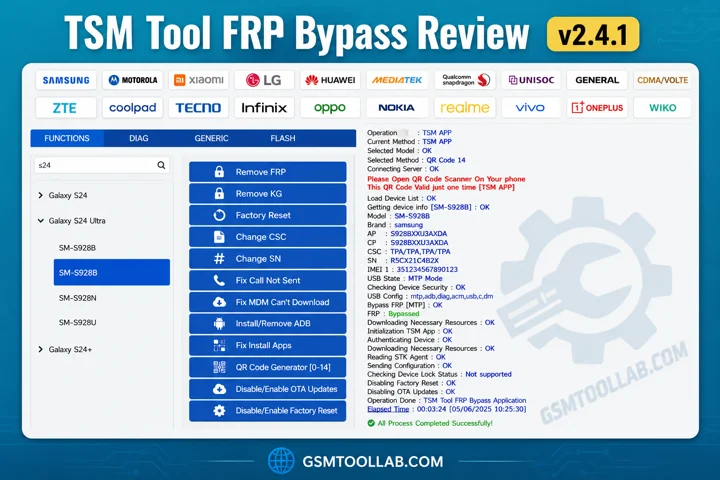
The TSM tool is designed for Windows-based mobile repair efficiency. It can help in different domains like FRP removal, flash firmware, IMEI repair, and MDM removal. The tool uses ADB and fastboot mode to connect a computer to a mobile for repairing purposes. Whether you are a beginner or experienced, you can use it easily due to its simple dashboard to operate. You can download the TSM tool from our website and fix your mobile issue in just a few clicks.
FAQ’s
Can I customize the TSM tool?
You can use the tsm customize command to change the appearance of Tableau Server. Supported image formats include GIF, JPEG, and PNG.
What is a TSM server?
IBM Storage Protect (formerly IBM Spectrum Protect or Tivoli Storage Manager) is a platform for backup, recovery, and centralized data protection management.
Are TSM tools easy to use?
TSM-TOOL Pro is a hardware-based repair tool that supports FRP bypass, IMEI reset, and MDM removal. It is compatible with most Android devices and has a user-friendly interface.
Is the TSM tool good?
In summary, TSM-TOOL Pro is a versatile repair tool that helps users bypass FRP, repair IMEI, and remove MDM locks. It provides a reliable way to regain access to Android devices without performing a factory reset.